
— BANKING ASSISTANT —
Incoming payments that almost post themselves.
The Banking Assistant imports your bank statements, matches each payment to the correct invoice, lot and auction, and automatically posts clear matches. Unclear payments remain transparent and easy to review — no manual data entry and no searching through payment references.
◆ CAMT.053 / ISO 20022
◆ Automatic matching
◆ Multiple accounts
◆ Accounting handover
BANK STATEMENT · INCOME
Max Weber
1.150,00 €
Payment Reference: Invoice 2024-0517
ASSIGNED
Invoice 2024-0517 · Lot 1247
1.150,00 €
- Unique · Booked automatically
— THE PROCESS —
From bank statement to posted payment — in six steps.
Clear payments are processed without any manual intervention. Only genuinely unclear cases are passed on to your accounting team.
1
Import bank statements
Current incoming payments are imported automatically.
2
Analyse and match data
The system identifies the buyer, invoice, lot and auction and automatically reconciles the amounts.
3
Review the result
Matches are displayed clearly and transparently.
4
Process automatically
Clear payments are posted and approved automatically.
5
Flag unclear cases
Payments that cannot be matched unambiguously remain available for review.
6
Transfer the data
All payment data is made available to accounting in a structured format.
Clear payments are processed automatically. Unclear cases remain transparent and easy to review.
— BEFORE / AFTER —
Minutes per payment become seconds
BEFORE · MANUAL
Every payment handled manually
5-10 minutes per payment
- Open the bank statement and read it line by line
- Manually identify the buyer, invoice and lot
- Compare the amount with the outstanding balance
- Post the payment manually
- Approve shipping or collection separately
AFTER · WITH THE BANKING ASSISTANT
The assistant handles standard cases
Seconds per payment
- The bank statement is imported automatically
- Buyer, invoice, lot and auction are identified automatically
- Amounts are reconciled automatically
- Clear payments are posted automatically
- Lots are marked as paid and shipping is approved
— HOW THE MATCHING WORKS —
Transparent instead of a black box.
The Banking Assistant matches payments in clear, verifiable stages — and shows you why each payment was posted in a particular way.
Match the reference
The payment’s end-to-end reference is checked against your invoice number (document_id) — the most reliable match.
Search the payment reference
When the reference is missing, the system searches the payment description for invoice numbers and document references.
Check the amount
The payment amount is compared with the invoice’s outstanding balance — including tolerance for underpayments and overpayments.
Matching result
Clear match → posted automatically
The payment is assigned to the invoice, the outstanding balance is reduced and the lot is marked as paid.
Unclear match → suggested for manual review
The payment remains marked as open and the most likely match is presented for manual confirmation.
— SPECIAL CASES —
Even irregular cases remain manageable.
Underpayment
The payment is matched and the remaining amount stays visible as an outstanding balance.
Overpayment
The difference is shown and can be treated as credit or refunded.
Combined payment
A single payment covering several invoices is allocated across the individual outstanding balances.
Multiple accounts
Business, escrow and foreign-currency accounts are matched automatically using the IBAN.
— COCKPIT —
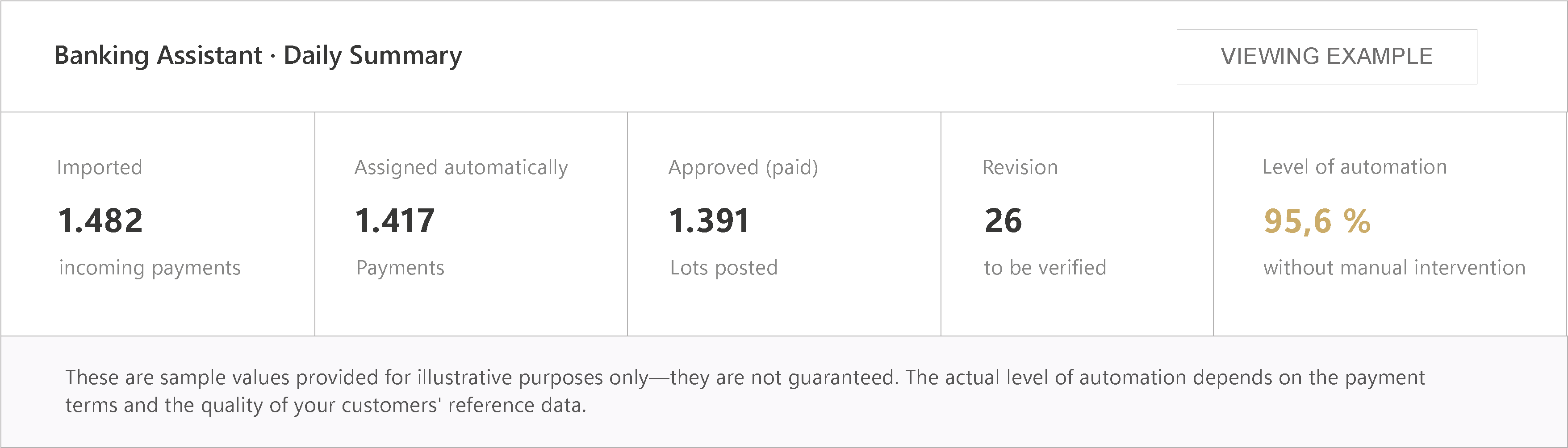
The overview your accounting team needs.
— THE BENEFITS —
What the Banking Assistant brings to your auction house.
Less manual work
Standard cases are processed without manual intervention.
Greater accuracy
No more transcription errors from manual data entry.
Faster payment processing
Paid lots can be released for shipping sooner.
More transparency
Every match is clearly documented and traceable.
Reduced workload for accounting
Only genuinely unclear cases require attention.
Let your incoming payments sort themselves.
In a live demo, we will walk through a real bank statement — from import to approved shipping, using your invoices as an example.